Perspective Transform and Z Values
Without loss of generality, the camera can be positioned with the target at the origin and scaled so the position is at -1:

The perspective transform maps lines onto lines and planes onto planes, but it is a non-linear mapping (the relative spacing between points does not stay the same and angles are not preserved). The general form for mapping Z values is Z’ = Z / (Z + 1). This results in the “important” points of the camera mapping as:

mapping one semi-infinite range onto another.
Z-Buffering
While arbitrary float values can be used in most software, hardware Z-buffers have a fixed range, so we need to somehow trim the range. Since things aren’t normally viewed with the eye placed right against them, we can introduce a near limit (aka hither):

which limits the range of the output:
and a fixed range can then be mapped to the Z-buffer.
Near Limit Adjustment
Without the limit, anything behind the eye gives nonsensical results, so it needs to be trimmed. With the limit, anything behind the limit, while not necessarily nonsensical, lands outside the range we can map to the Z-buffer, so this must also be trimmed, and is called behind-the-eye clipping even if it’s not technically behind-the eye; it serves the same purpose. Because of this, you don’t want the limit too high as it will chop away at the model, but you want to avoid having it too small due to the non-linearity causing loss of precision for things farther from the eye.
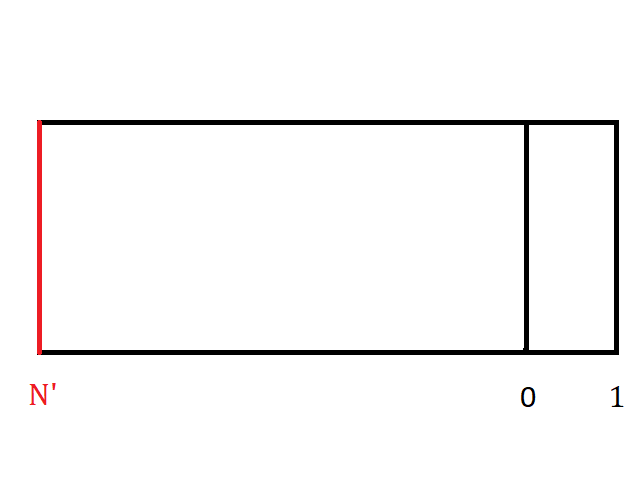
In the pictures above, N was placed at about w = 0.1 of the distance from the eye to the target (so let’s call it -0.9), which puts N’ at -9.0. Note that this means the part of the model from [-0.9,0] maps to [-9,0] while [0,∞] maps to [0,1] – 90% of the output range is taken up by the parts of the model between the near limit and the target, while everything beyond the target is squeezed into the final 10%.
For reference, HOOPS originally used w = 0.001 for its fixed near limit, making the divisions 99.9% and 0.1% !
The code allows the user to specify the near limit, but it also allows for automatic adjustment, if a negative value is specified. The limit will first be set at the positive equivalent, but if the bounding of the model is in front of that, it can then be pushed to a higher value. For example, if the object is all above -0.5, putting the limit there allows the output range to be split at 50% – a nice improvement on the resolution available for the more distant parts of the model.
The default is now -0.001, so it won’t near clip anything it didn’t before, but it’s allowed to adjust when it can.
One question that comes up occasionally is about defining a far clip (yon) plane. Since our camera form would want it to be beyond the target, the yon would land somewhere in the very right of the [0,1] part of the output. Removing that tiny amount to stretch the remainder isn’t worth it.
Orthographic
The basic orthographic projection is simpler since it it completely linear, but orthographic represents an infinite range (everything behind and in front of the target) to try to map to the finite Z-buffer. The obvious solution is just to chop it at some distance on either side of the target, but how much? When face displacement was first being worked on, it turned out that making the limits +/- 1/w (or, for the non-normalized camera, +/- camera_distance / w) worked well, so we could keep the same default for the near limit. When the limit is allowed to adjust, it’s basically the same, though it has to watch both ends when trying to move them toward the target.