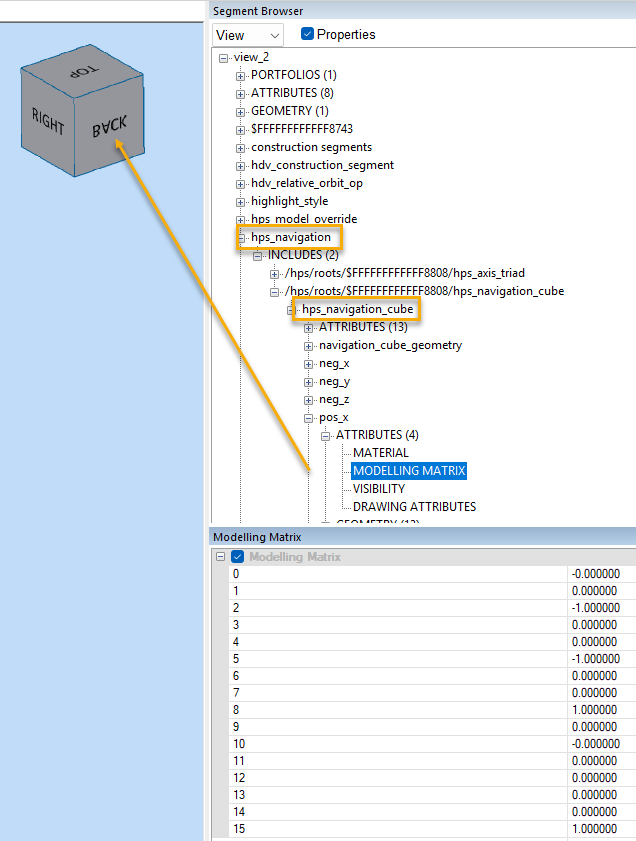
Hi,
I’m looking for some guidance on configuring the text displayed on the Navigation Cube faces.
Currently, we enable and configure the cube as follows:
void EnableNavigationCube( bool interactive )
{
HPS::TextAttributeKit textAttributeKit { HPS::TextAttributeKit::GetDefault() };
textAttributeKit.SetSize( 25,  HPS::Text::SizeUnits::Pixels )
.SetAlignment( HPS::Text::Alignment::Center )
.SetBold( true );

textAttributeKit.SetRotation( HPS::Text::Rotation::Rotate );
m_canvas.GetFrontView()
.GetNavigationCubeControl()
.SetVisibility( true )
.SetLocation( HPS::NavigationCubeControl::Location::TopRight )
.SetText( “Right”, “Back”, “Bottom”, “Left”, “Front”, “Top”, textAttributeKit )
.SetSize( 0.25f );

m_canvas.GetFrontView()
.GetNavigationCubeControl()
.SetInteractivity( interactive );
}
We’ve noticed that some face labels appear in a different orientation than desired. For example, we would like the “Back” label to have the same text orientation as “Top”, but it currently renders rotated relative to it.

Is there any way to control or override the orientation of individual face labels on the Navigation Cube?
Additionally, is there a way to keep the Navigation Cube text always upright (screen-aligned) so that it does not rotate with the cube?
Thanks in advance for any help or insight.